Some services like video upload to social media like Facebook, YouTube, etc via API need some time to process the request as it takes time to finish the processing of a video by Facebook or YouTube.
At Craftsmen, for one of our customers we have a service API where users can send us requests with a video URL, and in which social media platform the video should be uploaded, our API will upload the video to the provided social media platform in a short moment. But the problem is that we don’t know when the processing from these social media platforms will be finished.
Let’s first see our workflow to upload a video.
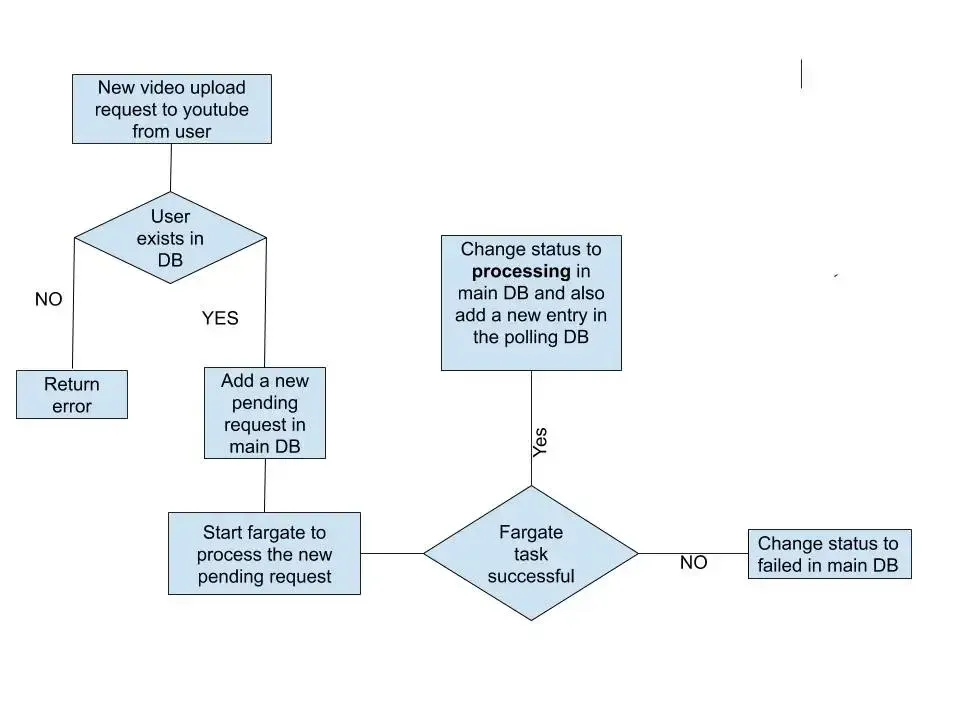 So you can see that the request is directly passed to AWS Fargate because it may take more than 30 seconds to upload the video and any API request will last till 29 seconds and after that, it will return response even if the request is still processing. Now one problem arises is that the Fargate task only feeds the video to the social media platform’s API like Facebook graph API and YouTube data API. We don’t actually know if the video upload is successful or not as processing may take at least 2–3 minutes.
So we introduced a CRON lambda-based solution to overcome the problem. The basic idea is shown in the flowchart below:
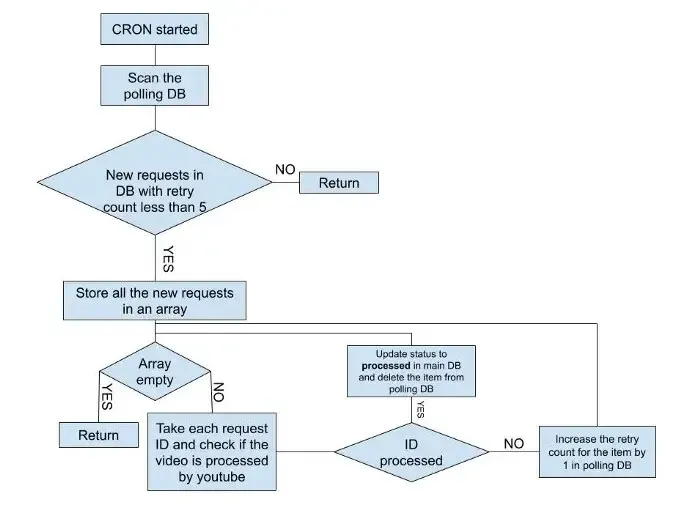
The main theme is that, whenever a new request comes to the AWS Fargate task, after uploading it, we save the video information in the main DB as a processing state and add a new item in another DB called Polling DB. Our CRON lambda runs after every 5 minutes and checks if there is any new item in the Polling DB. If so, then it tries to fetch the info. about the item from the social media API and update the main DB accordingly.
The code for the CRON lambda is simple. To make a lambda run as a CRON job, we just need to specify in the YML like below:
Name of your lambda:
 handler: source to your handler lambda
 events:
  - schedule: rate(5 minutes)
rate (5 minutes) means that the CRON will run after every 5 minutes. We use node JS and TypeScript. To test it offline, you will need a plugin called serverless-offline-scheduler. You will find it in the npm library.
Main code is below:
const deleteInfoFromPollingTable = async (id: string) => { const params = { TableName: tableName, Key: { id, }, }; try { await dynamodb.delete(params).promise(); return true; } catch (err) { console.log(err); return false; } }; const getAllNewItemsFromDb = async () => { const param = { TableName: tableName, }; const res = await dynamodb.scan(param).promise(); const newItems: PollingInfo[] = []; if (res && res.Items && res.Items.length > 0) { for (const item of res.Items) { if (isPollingEntity(item)) { if (!item.pollStatus && item.pollCount < 5) newItems.push(item); if (item.pollCount >= 5) { await updateMainDatabase(item.id, PostStatus.Unprocessed); } } } } return newItems; }; const getYoutubeVideoStatus = async (id: string, refreshToken: string, postId: string, pollCount: number) => { auth.setCredentials({ refresh_token: refreshToken }); const tokens = await auth.refreshAccessToken(); auth.setCredentials(tokens.credentials); google.youtube(‘v3’).videos.list( { auth, id: postId, part: ‘statistics’, }, async (err: Error | null, msg: any) => { if (err) { console.log(err); await setProcessingStatus(id, pollCount, false); } else { console.log(msg.data.items); if (!msg.data.items || msg.data.items.length === 0) { await setProcessingStatus(id, pollCount, false); } else { await updateMainDatabase(id, PostStatus.Processed); } } } ); };
import { ScheduledEvent, Context } from ‘aws-lambda’; import { DynamoDB } from ‘aws-sdk’; import { isPollingEntity, PollingInfo } from ‘@/src/lambda/database/entity/pollingInfoEntity’; import { PostStatus } from ‘@/src/type/input’; import { google } from ‘googleapis’; const youtubeAppClient: any = process.env.youtubeAppCLient; const youtubeSecret: any = process.env.youtubeSecret; const auth = new google.auth.OAuth2({ clientId: youtubeAppClient, clientSecret: youtubeSecret, }); const dynamodb = new DynamoDB.DocumentClient(); const tableName: any = process.env.POLLTABLE; const mainTable: any = process.env.POST_DYNAMODB_TABLE; export const pollItemInfo = async (event: ScheduledEvent, context: Context) => { const newItems = await getAllNewItemsFromDb(); console.log(newItems); const updatePromise = []; const youtubePromise = []; for (const item of newItems) { updatePromise.push(setProcessingStatus(item.id, item.pollCount, true)); youtubePromise.push(getYoutubeVideoStatus(item.id, item.refreshToken, item.postId, item.pollCount)); } await Promise.all(updatePromise); await Promise.all(youtubePromise); }; const setProcessingStatus = async (id: string, pollCount: number, pollStatus: boolean) => { const params = { TableName: tableName, Key: { id }, UpdateExpression: ‘set pollStatus = :pollStatus,pollCount = :pollCount’, ExpressionAttributeValues: { ‘:pollCount’: pollCount + 1, ‘:pollStatus’: pollStatus, }, ReturnValues: ‘UPDATED_NEW’, }; try { await dynamodb.update(params).promise(); return true; } catch (error) { console.log(error); return false; } }; const updateMainDatabase = async (id: string, status: string) => { const params = { TableName: mainTable, Key: { id }, UpdateExpression: ‘set #sts = :postStatus’, ExpressionAttributeNames: { ‘#sts’: ‘status’, }, ExpressionAttributeValues: { ‘:postStatus’: status, }, ReturnValues: ‘UPDATED_NEW’, }; try { await dynamodb.update(params).promise(); await deleteInfoFromPollingTable(id); return true; } catch (error) { console.log(error); return false; } };
You are on the list
The next letter goes out at the start of the month.